> ## Documentation Index
> Fetch the complete documentation index at: https://docs.cashmere.exchange/llms.txt
> Use this file to discover all available pages before exploring further.
# Security
> What protects your position, what to check before you sign, how to remove approvals and how to leave without the app.
 Goat LP is experimental. Use small amounts.
The Goat LP contracts have been through internal security reviews. The app only sends an automation
transaction when the code at the contract's address matches the build pinned in the app.
## The short version
Automation works through a permission for one position. Where a contract needs the NFT for a moment,
it comes back in the same transaction, or the whole transaction fails.
Token approvals are for the exact amount. On Uniswap v4 they go through Permit2 and expire after
30 minutes.
The app decodes the final transaction and refuses it unless the recipient, minimums, deadline, contract
and fee are all as expected.
No proxy, no delegatecall. A Cashmere-controlled Safe owns the contracts. Adding a keeper, a pair or a
price source waits 24 hours in public. See [Contracts](/goat-lp/contracts#roles).
## What the app checks before you sign
Goat LP is experimental. Use small amounts.
The Goat LP contracts have been through internal security reviews. The app only sends an automation
transaction when the code at the contract's address matches the build pinned in the app.
## The short version
Automation works through a permission for one position. Where a contract needs the NFT for a moment,
it comes back in the same transaction, or the whole transaction fails.
Token approvals are for the exact amount. On Uniswap v4 they go through Permit2 and expire after
30 minutes.
The app decodes the final transaction and refuses it unless the recipient, minimums, deadline, contract
and fee are all as expected.
No proxy, no delegatecall. A Cashmere-controlled Safe owns the contracts. Adding a keeper, a pair or a
price source waits 24 hours in public. See [Contracts](/goat-lp/contracts#roles).
## What the app checks before you sign
 If any rule fails, your wallet never sees the request.
* **Recipient.** Every output goes to your connected wallet.
* **Paying with ETH.** On a WETH pair the deposit goes straight to Uniswap's position manager and ends with the
refund of unused ETH to your wallet in the same transaction (v3 `refundETH`, v4 `SWEEP`). The app refuses any
request that would leave ETH or WETH in a contract or send it anywhere but your wallet.
* **Minimums and deadline.** Every swap, add and remove has a minimum above zero; deadlines are minutes away.
* **Known contracts.** Contract addresses come from the app's own build, never from the analytics API, and
automation code is checked on chain against the pinned version.
* **Fee.** A Goat LP fee may go only to the fee address, at exactly the configured rate.
* **Permissions.** An automation permission must be for one position, to a Goat automation contract.
* **Simulation.** Every action is simulated on chain before it is offered for signing.
## What you should check
* **The address bar:** only `app.cashmere.exchange`. Cashmere never messages you first.
* **The contract** in your wallet: a Uniswap contract, Permit2, Revert Finance's V3Utils, or a Goat contract
listed on [Contracts](/goat-lp/contracts).
* **Approvals:** a token approval names the exact amount; a position permission is `approve` for one
position number.
* **Wallet-wide permissions:** Goat LP asks for `setApprovalForAll` in one place only:
[Allow for all positions](/goat-lp/allow-for-all-positions), after its own consent screen, to the one
address on Contracts. If anything else asks, stop.
* **Never** sign a message you do not understand, and never type a seed phrase anywhere.
## Remove approvals
| What | How |
| - | - |
| An automation | **Stop** in the app. It turns the rule off and removes the permission, then checks the chain |
| A position permission, on the explorer | `approve(0x0000000000000000000000000000000000000000, yourPositionId)` on the v3 or v4 position manager. `getApproved(yourPositionId)` must then return the zero address |
| A token approval | Exact approvals are used up by the action. To clear a rest, `approve(spender, 0)` on the token |
| An operator approval you gave elsewhere | `setApprovalForAll(thatOperator, false)` on the position manager |
## Leave without the app
You do not need Goat LP to get out, unless the pool's hook or one of its tokens blocks it. Each step is a
transaction you sign on the block explorer (Contract, then Write). Check every argument before signing.
On the v3 or v4 position manager, call `approve(0x0000000000000000000000000000000000000000,
yourPositionId)`. Without the permission no automation can touch the position.
A permit you signed earlier could set the permission again until it is used or expires. Call
`revokeNonce(nonce)` on the v4 position manager. The app's **Stop** does this for you.
Auto-compound: `configToken` with an all-off setting on the auto-compound contract. Auto-range or
auto-exit on v4: `clearConfig(yourPositionId)` on the Steward; it works even when the contract is paused.
On v3: `configToken` with an all-zero setting on the auto-range or auto-exit contract.
On v3, call `decreaseLiquidity` and then `collect` to your address. Minimums of 0 accept any price; only
use 0 if you accept that. On v4, use Uniswap's interface or the Withdraw button in Goat LP, which does
not depend on the analytics API.
If an NFT were ever stuck in a Goat compound contract, only its owner, the Cashmere-controlled Safe, can
move it out with `emergencyWithdrawNFT`. Contact us below.
## How Goat LP is watched
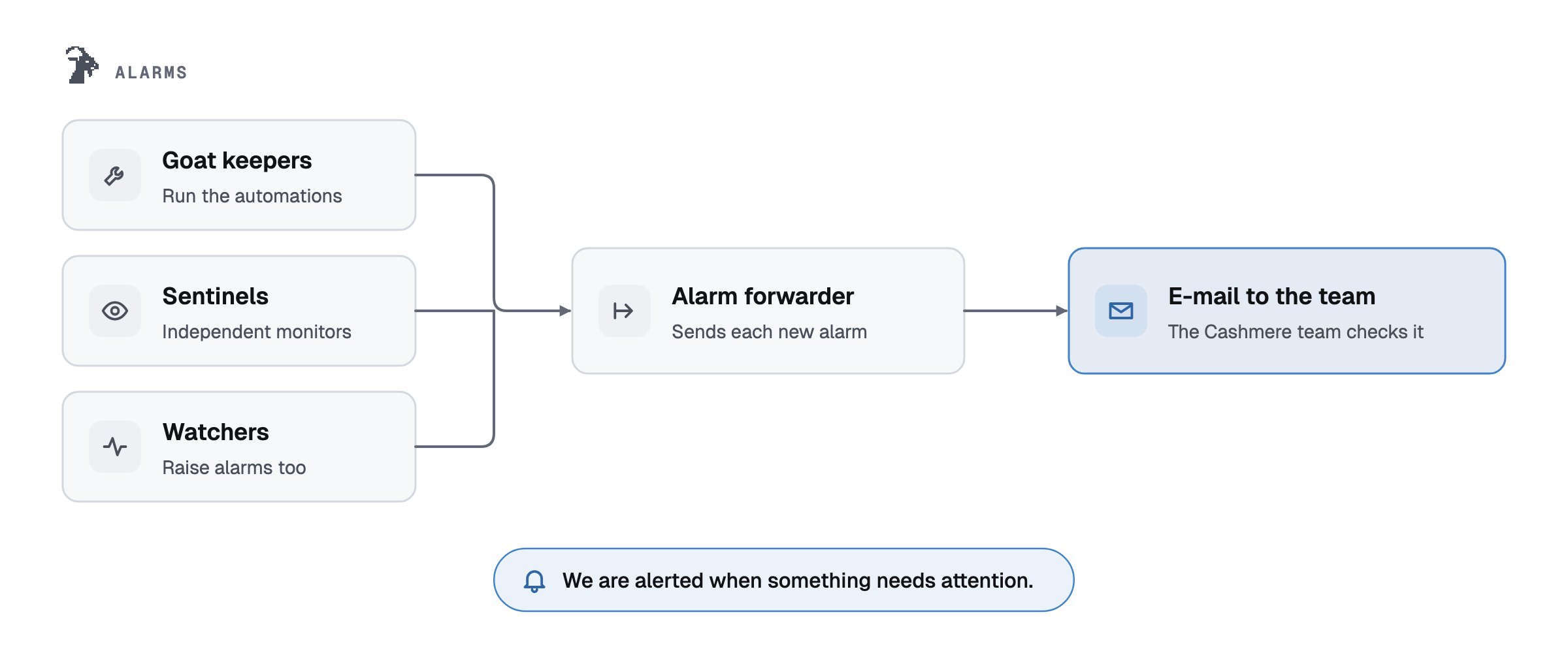
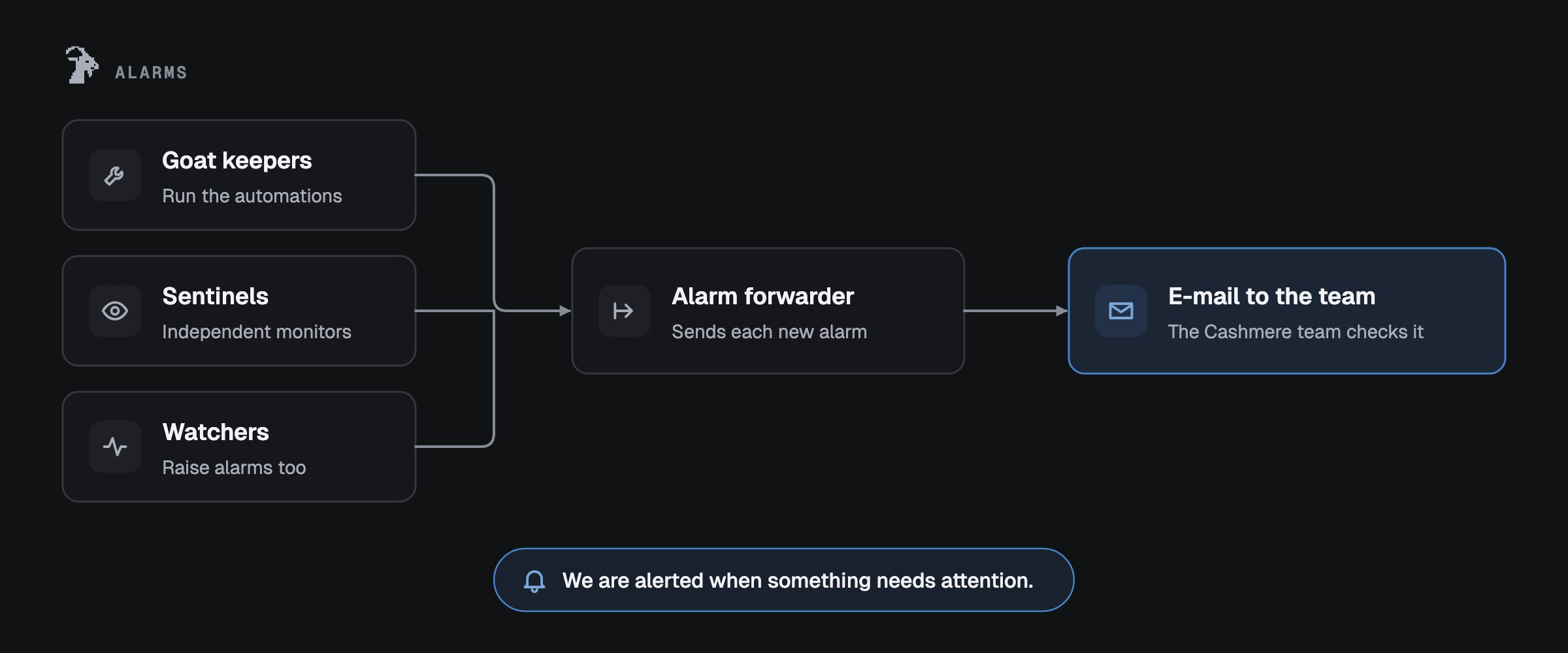
Keepers, sentinels (the independent safety monitors) and watchers raise alarms, and every alarm reaches the
Cashmere team by e-mail. The team can pause at once through the guardian Safe.
If any rule fails, your wallet never sees the request.
* **Recipient.** Every output goes to your connected wallet.
* **Paying with ETH.** On a WETH pair the deposit goes straight to Uniswap's position manager and ends with the
refund of unused ETH to your wallet in the same transaction (v3 `refundETH`, v4 `SWEEP`). The app refuses any
request that would leave ETH or WETH in a contract or send it anywhere but your wallet.
* **Minimums and deadline.** Every swap, add and remove has a minimum above zero; deadlines are minutes away.
* **Known contracts.** Contract addresses come from the app's own build, never from the analytics API, and
automation code is checked on chain against the pinned version.
* **Fee.** A Goat LP fee may go only to the fee address, at exactly the configured rate.
* **Permissions.** An automation permission must be for one position, to a Goat automation contract.
* **Simulation.** Every action is simulated on chain before it is offered for signing.
## What you should check
* **The address bar:** only `app.cashmere.exchange`. Cashmere never messages you first.
* **The contract** in your wallet: a Uniswap contract, Permit2, Revert Finance's V3Utils, or a Goat contract
listed on [Contracts](/goat-lp/contracts).
* **Approvals:** a token approval names the exact amount; a position permission is `approve` for one
position number.
* **Wallet-wide permissions:** Goat LP asks for `setApprovalForAll` in one place only:
[Allow for all positions](/goat-lp/allow-for-all-positions), after its own consent screen, to the one
address on Contracts. If anything else asks, stop.
* **Never** sign a message you do not understand, and never type a seed phrase anywhere.
## Remove approvals
| What | How |
| - | - |
| An automation | **Stop** in the app. It turns the rule off and removes the permission, then checks the chain |
| A position permission, on the explorer | `approve(0x0000000000000000000000000000000000000000, yourPositionId)` on the v3 or v4 position manager. `getApproved(yourPositionId)` must then return the zero address |
| A token approval | Exact approvals are used up by the action. To clear a rest, `approve(spender, 0)` on the token |
| An operator approval you gave elsewhere | `setApprovalForAll(thatOperator, false)` on the position manager |
## Leave without the app
You do not need Goat LP to get out, unless the pool's hook or one of its tokens blocks it. Each step is a
transaction you sign on the block explorer (Contract, then Write). Check every argument before signing.
On the v3 or v4 position manager, call `approve(0x0000000000000000000000000000000000000000,
yourPositionId)`. Without the permission no automation can touch the position.
A permit you signed earlier could set the permission again until it is used or expires. Call
`revokeNonce(nonce)` on the v4 position manager. The app's **Stop** does this for you.
Auto-compound: `configToken` with an all-off setting on the auto-compound contract. Auto-range or
auto-exit on v4: `clearConfig(yourPositionId)` on the Steward; it works even when the contract is paused.
On v3: `configToken` with an all-zero setting on the auto-range or auto-exit contract.
On v3, call `decreaseLiquidity` and then `collect` to your address. Minimums of 0 accept any price; only
use 0 if you accept that. On v4, use Uniswap's interface or the Withdraw button in Goat LP, which does
not depend on the analytics API.
If an NFT were ever stuck in a Goat compound contract, only its owner, the Cashmere-controlled Safe, can
move it out with `emergencyWithdrawNFT`. Contact us below.
## How Goat LP is watched
Keepers, sentinels (the independent safety monitors) and watchers raise alarms, and every alarm reaches the
Cashmere team by e-mail. The team can pause at once through the guardian Safe.
 ## Report a vulnerability
Email [contact@cashmere.exchange](mailto:contact@cashmere.exchange) with the contract, the steps to
reproduce and the impact. Please do not test against other people's positions on mainnet, and give us time
to fix an issue before sharing details publicly.
This documentation is built and hosted on [Mintlify](https://mintlify.com), a developer documentation platform.
## Report a vulnerability
Email [contact@cashmere.exchange](mailto:contact@cashmere.exchange) with the contract, the steps to
reproduce and the impact. Please do not test against other people's positions on mainnet, and give us time
to fix an issue before sharing details publicly.
This documentation is built and hosted on [Mintlify](https://mintlify.com), a developer documentation platform.