

What it covers
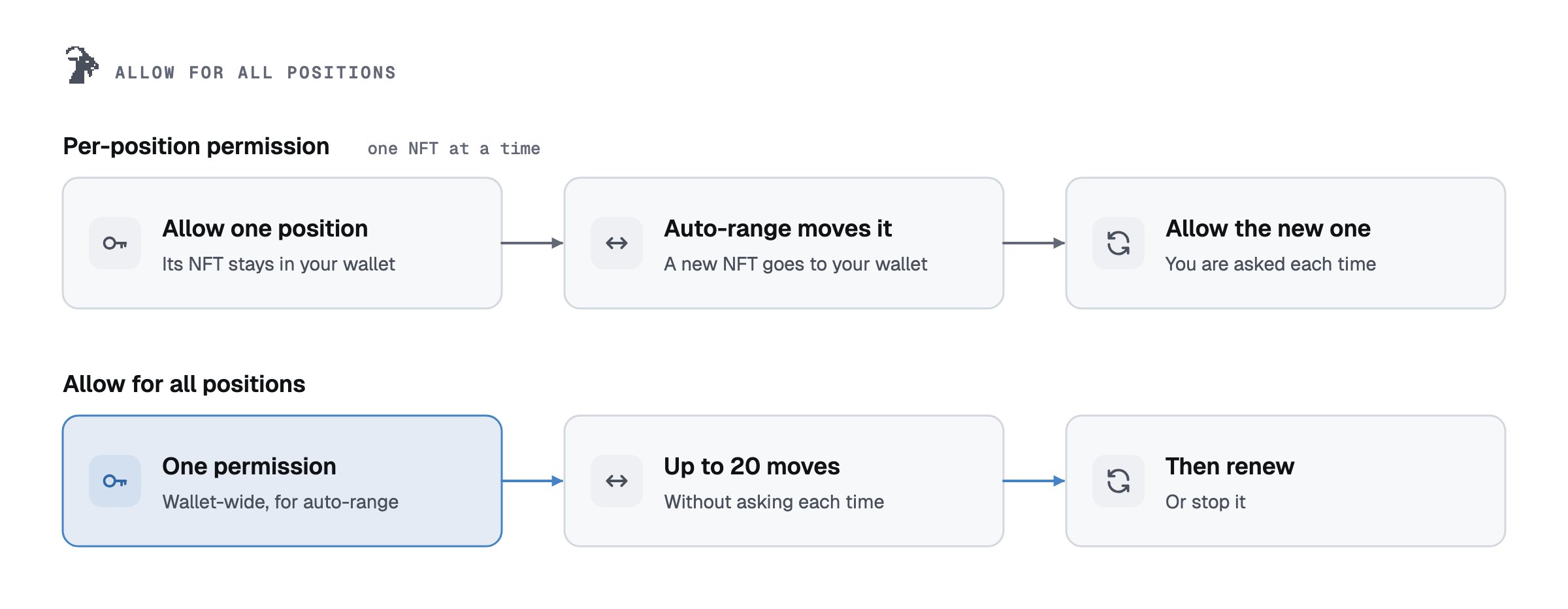
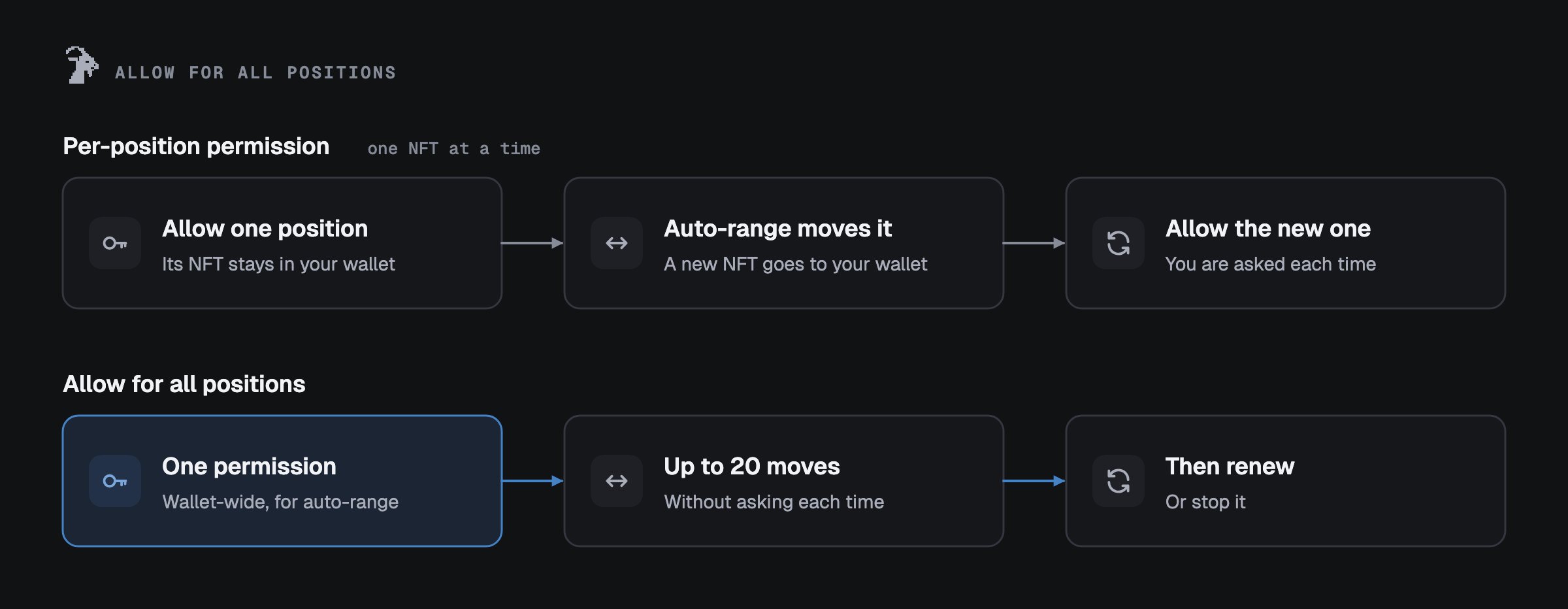
- It covers every Uniswap v3 (or v4) position in this wallet, now and later.
- The auto-range permission acts only on positions where you turned auto-range on. The contract checks this on every move. On v4 the same engine also runs auto-exit rules saved for this permission (see Auto-exit for all positions).
- A move closes the position and opens a new one in your wallet, centred on the current price, with the width your rule sets on v3 and the same width on v4. Apart from Goat’s fee, no tokens and no position go to anyone else.
Limits
Cost per move: 0.15% of the amount moved goes to Goat. The swapped part (about half) pays the pool’s
swap fee, and at most your price protection (0.50% by default; on v4 plus a 0.10% margin). Gas is paid by
us.
Turn it on
Choose Keep it running after every move when you set up auto-range. You can also turn it on from the Automation page:1
Open the consent screen
On the Automation page, press Keep it running (or Keep them running). The screen lists every rule the
permission will be able to run, each with a switch. A rule you switch off is turned off on the chain
first.
2
Tick the box and allow
Tick that you understand it covers all your positions of that version in this wallet, then press
Allow for all positions.
3
Check the address in your wallet
Your wallet shows
setApprovalForAll with one address: Goat AutoRange on v3, the Goat auto-range
engine on v4. It must match Contracts. Goat LP asks for setApprovalForAll only here
and in Auto-exit for all positions. If anything else asks for it, or names
another address, stop.How to stop
- Stop auto-range on the Automation page removes auto-range’s permission for all positions and any single-position permission Goat auto-range still has. Your wallet confirms each part. Then it reads them back: “Stopped. Goat auto-range can no longer act on a position of this wallet.”
- On v4, auto-exit rules saved for the permission for all positions use the same engine. The stop screen asks first: keep them running (the engine keeps that permission for them) or stop them too. Auto-exit rules that use their own permission for one position keep running either way, and the stop screen names them. If this site could not read every v4 position, the engine keeps that permission unless you also stop auto-exit, and the result says that some v4 positions could not be checked. Auto-compound is not changed.
- Stop auto-exit for all positions: on v3 it removes the AutoExit permission for all v3 positions first; then you can delete the rules, one transaction each. On v4 the permission is the engine’s, which auto-range rules saved for it use too: when they do, the stop screen asks first whether they keep running. With “Also stop auto-range”, an auto-range rule that still has its own permission for one position can move once more, then it stops. On both, auto-exit rules that use their own permission for one position keep running, and the stop screen names them. Auto-compound is not changed.
- If the permission cannot be read again right after either of these stops, the result says so and claims nothing as stopped; Try again reads it again.
- Stop this position on a position page stops only that rule; the permission stays for the others. On a position where auto-exit and auto-compound run together, it removes that rule and its own permission; the stop screen says the other rule on the position is not changed.
- Without the app: call
setApprovalForAll(goatAddress, false)on the v3 or v4 position manager.isApprovedForAll(yourWallet, goatAddress)must then returnfalse. See Security.
Auto-exit for all positions
Auto-exit can run next to auto-compound on the same position when auto-exit uses a permission for all positions. Auto-compound keeps its own permission for that one position (on v4, its own signed messages). Auto-range still runs alone.- It covers every Uniswap v3 (or v4) position in this wallet, now and later.
- v3: the permission goes to Goat AutoExit. The contract can act on any position in this wallet that has an auto-exit rule this wallet set. Goat’s system runs a rule only if this wallet set or confirmed it after giving this permission; a rule set up earlier waits until you confirm it.
- v4: it is the same permission that keeps auto-range running (the Goat engine). The engine runs only rules saved for this permission. Goat’s system pauses such a rule if its position left this wallet and came back, until you confirm it.
- An auto-exit closes the position once, at your level. Apart from Goat’s fee and, on a side that swaps, the pool’s swap fee, the tokens go to this wallet.
- Before the permission is given, the rules you leave off, rules on empty positions and rules whose level is already reached are turned off on the chain.
Cost: 0.15% of the amount closed goes to Goat, once. If a side swaps: the pool’s swap fee, and at most your
price protection (0.50% by default). Auto-compound: 10% of the fees added back. Gas is paid by us.
Turn it on: on the auto-compound card of a position with an auto-exit, press Allow auto-exit for all
positions, choose the auto-compound settings and press Review. When the permission is off, the steps start with
the consent screen on the Automation page; it lists every auto-exit rule the permission would let run, each with
what happens to it, and brings you back to your setup. Your wallet shows
setApprovalForAll with Goat AutoExit
on v3 or the Goat engine on v4; it must match Contracts. It is offered only while Goat’s
system runs its confirmation check; otherwise the site shows “Not live yet”, and the card keeps its switch.
How to stop: Stop auto-exit for all positions on the Automation page removes this permission. If your v4
auto-range rules use it too, the stop screen asks first whether they keep running; if they do, the permission stays
for them. Without the app: setApprovalForAll(GoatAutoExit, false) on the v3 position manager (v4: the Goat engine,
which also ends auto-range under it). Rules that use their own permission for one position keep running.